Popup Windows
Popups and Dialogs
Section titled “Popups and Dialogs”Sometimes your app needs to stop everything to tell the user something important or ask a quick question. In GooeyPie, we use Popups (also called modal dialogs) for this.These windows “float” on top of your app and must be dismissed before the user can go back to the main window.
Choosing a Category
Section titled “Choosing a Category”Every popup requires a category. This decides which icon is displayed and helps the user understand the “vibe” of the message:
| Value | Icon | Description |
|---|---|---|
'info' |  | General information or updates. |
'warning' |  | Alerts that require user caution. |
'error' |  | Indicates a problem that has occurred. |
'question' |  | Used when asking the user to make a choice. |
Simple Alerts
Section titled “Simple Alerts”Use an alert when you just want to give information and only need the user to click “OK”.
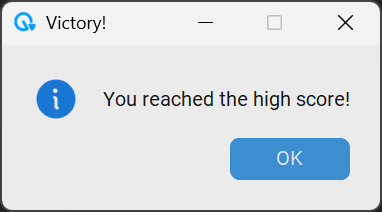
app.alert("Victory!", "You reached the high score!", "info")Note: The alert() method doesn’t return any value because there’s only one button to click!.
Asking Questions
Section titled “Asking Questions”These popups return a value based on what the user clicks. Here’s a quick reference for the different question popups:
| Method | Buttons Shown | Returns… |
|---|---|---|
app.ask_yes_no() | Yes, No | True (Yes) or False (No) |
app.ask_ok_cancel() | OK, Cancel | True (OK) or False (Cancel) |
app.ask_yes_no_cancel() | Yes, No, Cancel | True (Yes), False (No), or None (Cancel) |
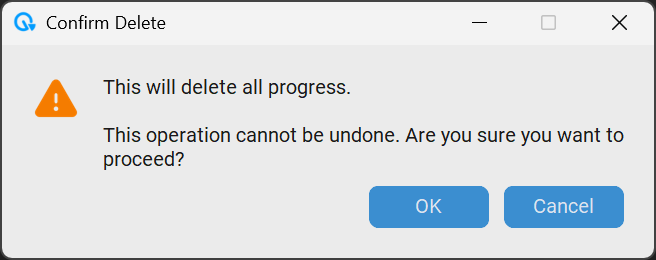
app.ask_ok_cancel("Confirm Delete", "This will delete all progress.\n\nThis operation cannot be undone. Are you sure you want to proceed?", "warning")Example: The “Are you sure?” Check
Section titled “Example: The “Are you sure?” Check”A common use for ask_yes_no is making sure a user actually wants to quit. You can combine this with the on_quit method of your app.
def confirm_exit(event):    # This popup returns True or False    should_exit = app.ask_yes_no("Confirm", "Do you really want to quit?", "question")    return should_exit
app.on_quit(confirm_exit)