About Events
Aside from the notable exception of Buttons (see below), when a user interacts with a widget, it does not automatically execute any code. But sometimes we want to do exactly that! For example:
- When a Checkbox is checked or unchecked, we might want to show or hide additional options.
- When the text in a Textbox changes, we might want to update a character count.
- When a Slider is moved, we might adjust the volume of music playing in the background.
When events are triggered, an event function is called and sent an event object, which contains information about the event.
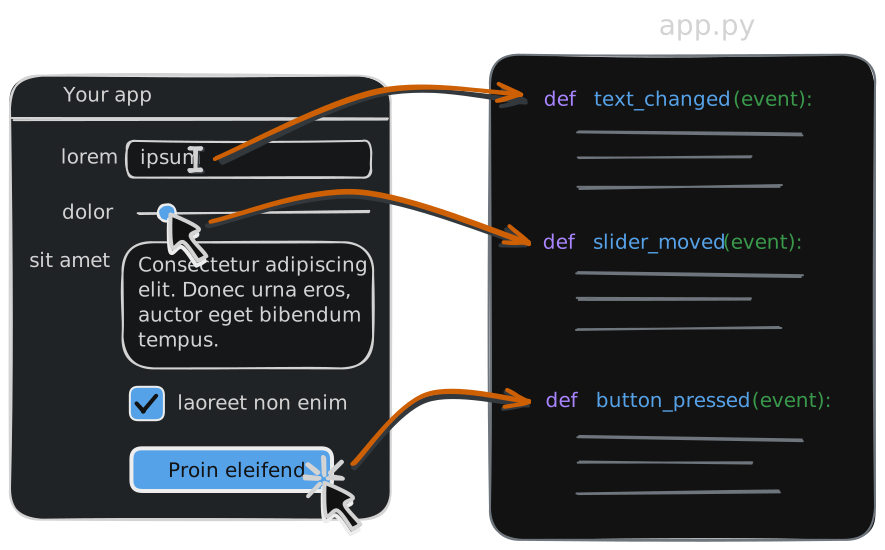
Buttons are special
Section titled “Buttons are special”A Button should always do something, so the event function for a button press is set when the button is first created. However, you can always just set to this None while developing the interface, and then add the event function later when you’re ready to make it do something.
Registering an Event Listener
Section titled “Registering an Event Listener”To set up a widget to respond to events:
- use an appropriate
.on_event(event_function)method on the widget, specifying the name of the event function. - Write an event function that will be called when the event occurs. This function must accept a single argument for the event object.
import gooeypie as gp
def mouse_entered(event):    status_lbl.text = "Mouse entered the square!"
def mouse_left(event):    status_lbl.text = "Mouse left the square!"
def mouse_clicked(event):    status_lbl.text = "Square clicked!"
def mouse_right_clicked(event):    status_lbl.text = "Square RIGHT-clicked!"
app = gp.GooeyPieApp("Events in GooeyPie")
# Make a blue square for an event targetevent_lbl = gp.Label()event_lbl.width = 100event_lbl.height = 100event_lbl.style.bg_color = "steelblue"
event_lbl.on_mouse_enter(mouse_entered)event_lbl.on_mouse_leave(mouse_left)event_lbl.on_click(mouse_clicked)event_lbl.on_right_click(mouse_right_clicked)
status_lbl = gp.Label("Interact with the square to see events")
app.add(event_lbl, 1, 1)app.add(status_lbl, 1, 2)
app.run()